
WhatsApp Auto Sender Extension
✓ Client-side workflow • No Meta Business API setup • Works with WhatsApp Web
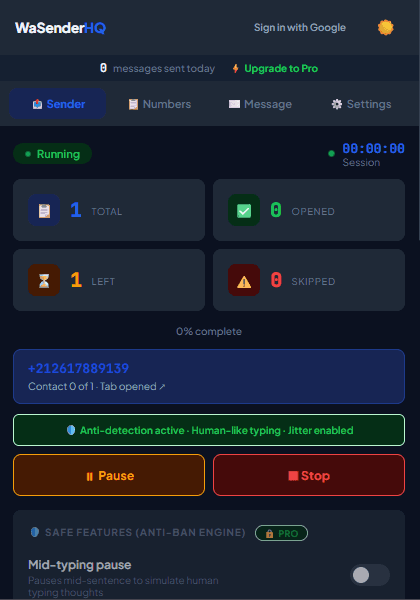
Repetitive manual copy-pasting slows down support desks and sales reps. An intelligent auto sender automates the mechanics of dispatching messages while preserving essential human oversight, consent safeguards, and delivery pace controls.
How WaSenderHQ Orchestrates Automated Queues
WaSenderHQ provides granular controls designed to maintain steady delivery while respecting WhatsApp Web operational constraints:
1. Measured Queue Pace
Choose a delay range that leaves room for review and supervision. Variable timing can make a queue easier to operate, but it does not disguise automation or guarantee account status.
2. Batching and Pause Breaks
For larger recipient lists, you can configure automatic pause breaks (e.g. pause for 60 seconds after every 25 messages) to allow the active WhatsApp Web session to process network acknowledgments smoothly.
3. Do Not Message Suppression Controls
Respecting customer preferences is essential. Any contact added to your Do Not Message suppression list is automatically skipped during queue execution, helping prevent repeat contact after an opt-out request.
4. Focused Retries for Failed Messages
Network hiccups or transient browser issues can occasionally cause individual messages to fail. Instead of re-running the entire campaign, WaSenderHQ allows you to retry only the failed recipients, ensuring no customer receives a duplicate message.
Start Sending WhatsApp Campaigns in Minutes — Try It Free
Install the official browser extension, open WhatsApp Web, and broadcast your personalized messages with smart delay pacing.
Frequently Asked Questions
Which controls help supervise an automated queue safely?
WaSenderHQ provides configurable delay intervals, pause and resume triggers, live queue counters, and an Account Health Meter to help you supervise dispatch pace. These controls cannot guarantee delivery or prevent restrictions.
Can I attach images or documents in auto-sender campaigns?
Yes. You can attach images (PNG, JPG) and supported documents (PDF) with custom personalized captions in both manual and automated campaigns.
What is the Do Not Message list in WaSenderHQ?
The Do Not Message list is an automated suppression list. If a contact opts out or asks not to be messaged, adding them to this list prevents accidental dispatches across all immediate and scheduled queues.
What happens if a message fails during an automated run?
WaSenderHQ logs the failure reason (e.g. invalid phone number) and continues the queue. With version 1.3.5, you can use "Retry Failed Messages" to re-process only unsuccessful rows.