
WhatsApp Bulk Sender Extension: Send Personalized Messages
✓ Client-side workflow • No Meta Business API setup • Works with WhatsApp Web
Watch How to Send Bulk WhatsApp Messages
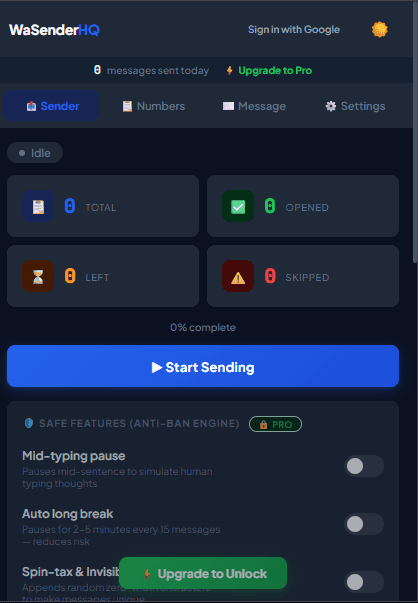
This WaSenderHQ tutorial demonstrates the complete beginner workflow inside WhatsApp Web—from opening the extension and preparing recipients to personalizing the message, choosing delays, and starting the queue.
Sending bulk WhatsApp messages helps businesses communicate appointment reminders, order updates, customer service notices, and promotional announcements directly to their audience. With WaSenderHQ, you can automate customer outreach from your browser tab without expensive developer APIs or complicated software installations.
Step-by-Step: How to Send Bulk WhatsApp Messages
Step 1: Install and Open WaSenderHQ in WhatsApp Web
Add the extension to Chrome or Firefox, navigate to web.whatsapp.com, and sign in with your phone. Once connected, open the WaSenderHQ sidebar panel to access the campaign builder.
Step 2: Import Your Recipient List
You can enter recipient numbers manually or import structured lists from CSV spreadsheets or Google Sheets. Ensure each number includes the full international country calling code without spaces, plus signs, or special characters (for example, 15551234567 for US or 447123456789 for UK).
Step 3: Draft Your Message with Dynamic Variables
Compose your message template and insert dynamic placeholders matching your spreadsheet headers, such as {Name}, {OrderNumber}, or {AppointmentDate}. Personalization makes each message relevant and significantly increases customer engagement.
Step 4: Configure Measured Delays and Random Jitter
Never dispatch a large queue instantaneously. Choose a measured delay range, supervise the first batch, and pause when recipients report a problem. Pacing controls support a careful workflow but cannot guarantee delivery or account status.
Step 5: Pre-Send Campaign Review
Before sending, WaSenderHQ displays a comprehensive campaign review showing valid numbers, filtered duplicates, invalid entries, Do Not Message suppressions, and live message previews. Start the queue and monitor real-time delivery logs.
Key Features of WaSenderHQ Bulk Sender
- Zero API Setup: Run campaigns directly from your regular WhatsApp or WhatsApp Business Web session.
- Spreadsheet Imports: Seamless integration with Microsoft Excel (.csv) and Google Sheets.
- Multi-Field Personalization: Insert unlimited custom columns into message templates.
- Attachment Support: Combine images, catalogs, or PDF invoices with customized text captions.
- Focused Failure Retries: Re-attempt only contacts that failed without duplicate dispatches to successful recipients.
- Do Not Message List: Maintain an active suppression list to respect recipient opt-outs automatically.
Responsible WhatsApp Sending Guidelines
Recipient feedback and platform rules can affect an account. To run a responsible workflow:
- Send only to contacts who opted in or have an existing business relationship with you.
- Include clear opt-out instructions (such as "Reply STOP to unsubscribe") and add unsubscribes to your suppression list.
- Warm up a new workflow with a small, supervised batch and increase volume only when recipients expect the messages and feedback remains healthy.
- Use Spintax variation to alternate greetings and sentence structures across recipients.
Start Sending WhatsApp Campaigns in Minutes — Try It Free
Install the official browser extension, open WhatsApp Web, and broadcast your personalized messages with smart delay pacing.
Frequently Asked Questions
How does the WhatsApp Bulk Sender browser extension work?
WaSenderHQ runs as a browser extension beside your active WhatsApp Web session. It reads the contact list you choose, maps spreadsheet fields into template variables, and prepares a queue that starts only after you review it.
Do I need a WhatsApp Business API account to send bulk messages?
No. WaSenderHQ operates directly inside your active WhatsApp Web session in Google Chrome or Mozilla Firefox. You do not need to configure Meta developer credentials, business portfolios, or pay per-conversation API fees.
Which controls help me manage sending pace and avoid account restrictions?
WaSenderHQ provides configurable delay controls, pause options, and an Account Health Meter. These settings help you supervise queue pace; they do not simulate a person or guarantee delivery or account status. Send only to people who expect your messages and honor opt-out requests immediately.
Can I attach images, PDF documents, or brochures to bulk messages?
Yes. WaSenderHQ supports attaching images (PNG, JPG) and supported documents (PDF) alongside personalized text captions. You can preview attachment formatting prior to starting the queue.