
Personalized WhatsApp Mass Messaging
✓ Client-side workflow • No Meta Business API setup • Works with WhatsApp Web
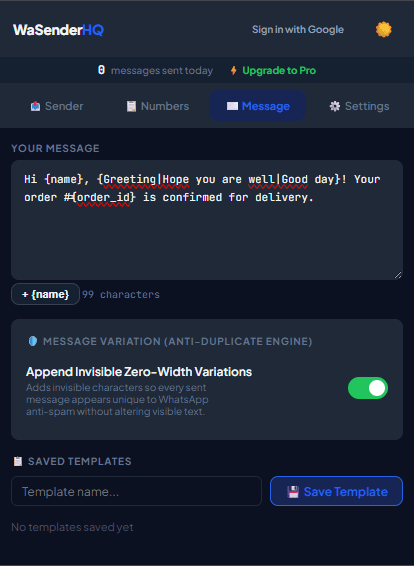
Generic messages can feel irrelevant. Adding useful personalization—such as the recipient's first name, recent order details, or appointment time—can make an expected follow-up clearer and more useful.
The Power of Dynamic Variable Mapping
WaSenderHQ allows you to map any column header from your CSV or Google Sheet into your message template:
{First Name}: Greet customers by name (e.g., "Hi Sarah," instead of "Dear customer,").{Order ID}&{Delivery Date}: Provide operational clarity for e-commerce status updates.{Balance Due}&{Payment Link}: Streamline invoice collection with tailored payment links.{Agent Name}: Direct replies to the specific account executive assigned to the client.
Message Variation With Spintax
Spintax lets you prepare equivalent phrases for a message. Use it to keep copy natural and readable; unique wording does not change recipient expectations or guarantee delivery.
With Spintax variation, you can randomize phrasing across your campaign:
{Hello|Hi|Good afternoon} {Name}, {your appointment is confirmed for|we look forward to seeing you on} {Date}.WaSenderHQ dynamically resolves this template for each recipient, creating hundreds of distinct message variations while conveying the exact same information.
Previewing and Verifying Personalization Before Sending
Before launching a queue, use WaSenderHQ's interactive preview slider to cycle through real recipient rows. Verify that names are capitalized, phone numbers are formatted correctly, and optional variables resolve cleanly without missing text.
Start Sending WhatsApp Campaigns in Minutes — Try It Free
Install the official browser extension, open WhatsApp Web, and broadcast your personalized messages with smart delay pacing.
Frequently Asked Questions
How do variable tags work in message templates?
Place column headers in curly brackets like {Name} or {InvoiceID}. WaSenderHQ matches these tags to your spreadsheet headers and replaces them with recipient-specific values automatically.
What is Spintax and how should it be used?
Spintax allows you to specify equivalent phrases using curly brackets and pipes, such as {Hi|Hello|Hey}. WaSenderHQ selects one prepared option per recipient. Variation can reduce repetition, but it does not replace consent, relevance, or platform compliance.
What happens if a spreadsheet cell for a placeholder is blank?
If an optional field is empty, you can configure fallback values (e.g. {Name|there}) so the resulting message remains grammatically correct.
Can I format text with bold, italics, and emojis in templates?
Yes. Full WhatsApp markdown formatting is supported: use *bold*, _italics_, ~strikethrough~, monospace, and any standard unicode emoji.