
WhatsApp Sender for Unsaved Numbers
✓ Client-side workflow • No Meta Business API setup • Works with WhatsApp Web
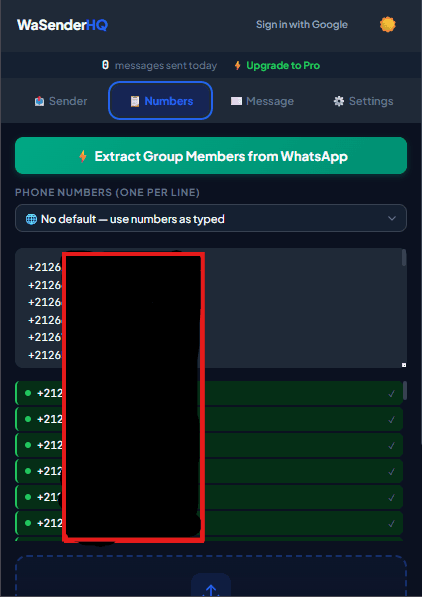
Adding every prospect, patient, client, or support requester into your personal phone contacts clutters your address book and slows down daily operations. WaSenderHQ lets sales teams, support desks, and recruiters initiate WhatsApp Web conversations directly from valid phone numbers without saving each one to Google Contacts or iCloud.
The Problem with Saving Every Business Lead
Traditional WhatsApp workflows force you to save a contact name, wait for cloud synchronization between your mobile phone and WhatsApp Web, search for the contact, and only then send a message. When handling 50 to 200 customer interactions per day, this manual process wastes hours of productive time and fills your personal device with temporary contacts.
How WaSenderHQ Streamlines Messaging to Unsaved Numbers
WaSenderHQ leverages WhatsApp's native deep-linking protocol inside your active browser session:
- Single Direct Chat: Paste any international number into the quick-dial bar and open an instant conversation window in one click.
- Bulk Unsaved Outreach: Paste a list of 100+ numbers or upload a spreadsheet. WaSenderHQ sequences the messages with measured delays between each recipient.
- Personalized Content: Even without saving the contact to your phonebook, you can map their name, invoice ID, or appointment date from your spreadsheet into the message template.
International Number Formatting Rules
To avoid delivery failures when sending to unsaved numbers, format your recipient list using standard E.164 numerical syntax:
- Correct:
14155552671(US),447911123456(UK),919876543210(India). - Incorrect:
+1 (415) 555-2671,07911 123456,00919876543210.
Ideal Use-Cases for Unsaved Number Outreach
- Customer Inquiries & Quotes: Respond promptly to lead generation forms without cluttering company smartphones.
- Delivery & Logistics Notifications: Send delivery ETA updates and courier tracking links to one-time buyers.
- Healthcare & Clinic Reminders: Remind patients of tomorrow's appointment time and clinic location.
- Event & Webinar RSVP: Send venue details or access links to registered attendees.
Start Sending WhatsApp Campaigns in Minutes — Try It Free
Install the official browser extension, open WhatsApp Web, and broadcast your personalized messages with smart delay pacing.
Frequently Asked Questions
Why does WhatsApp usually require saving a contact first?
WhatsApp was initially created as a personal messaging application where conversations originate from your smartphone address book. However, Meta supports the Click-to-Chat protocol, allowing chats with unsaved valid international numbers.
Can I message multiple unsaved contacts in bulk?
Yes. You can import a list of phone numbers with country codes into WaSenderHQ, and the extension will open sequential chats and send your message without saving any contact to your phonebook.
Will sending messages to unsaved numbers get my WhatsApp banned?
WhatsApp does not ban accounts purely for messaging unsaved numbers, but recipients who do not recognize you can report or block the chat. Always identify your business in the first sentence and contact only expected leads or customers.
How do I format international numbers for unsaved sending?
Include the full international calling prefix without symbols: omit leading zeros, plus signs, brackets, or hyphens (for example: 5511987654321 for Brazil or 919876543210 for India).