
Import a CSV into a WhatsApp Web Queue
✓ Client-side workflow • No Meta Business API setup • Works with WhatsApp Web
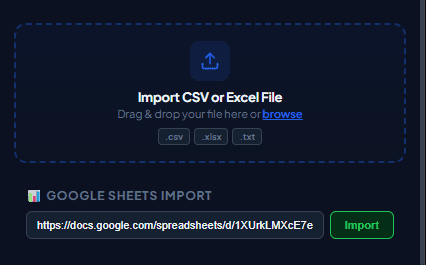
Exporting customer lists from CRMs like HubSpot, Salesforce, Zoho, or Shopify as a .csv file is the standard starting point for marketing and operational outreach. WaSenderHQ transforms static CSV files into dynamic, personalized WhatsApp Web broadcast queues in seconds.
How to Format and Import a CSV into WhatsApp Web
Step 1: Prepare Your Spreadsheet Headers
Ensure the first row of your spreadsheet contains distinct headers. Common columns include:
Phone: Complete international phone number with country code.Name: Recipient's first or full name for template greeting replacement.Custom Fields: Variables such asCompany,AmountDue,InvoiceLink, orTicketNumber.
Step 2: Save as CSV with UTF-8 Encoding
When saving from Microsoft Excel, choose CSV UTF-8 (Comma delimited) (.csv). UTF-8 encoding guarantees that accented names, non-Latin scripts (Arabic, Cyrillic, Devanagari), and emojis remain intact.
Step 3: Upload and Map Placeholders
Drag and drop your CSV file into the WaSenderHQ sidebar. The extension parses headers instantly. Map your phone column, insert placeholders into your message draft, and inspect real-time row previews.
Step 4: Launch and Export Campaign Logs
Start the campaign with measured delays. Upon completion, download a detailed activity log showing delivered, failed, and skipped rows for complete CRM record keeping.
Common CSV Formatting Mistakes to Avoid
- Excel Scientific Notation: Large numbers like
919876543210can turn into9.19876E+11. Format the column as Text before exporting. - Missing Country Codes: Local numbers (e.g.
98765-4321) will fail delivery without the country calling prefix. - Merged Cells: Ensure your table is a flat rectangular grid with one record per row.
Start Sending WhatsApp Campaigns in Minutes — Try It Free
Install the official browser extension, open WhatsApp Web, and broadcast your personalized messages with smart delay pacing.
Frequently Asked Questions
What CSV file format is required for WaSenderHQ?
Standard comma-separated value (.csv) files exported from Excel, Google Sheets, or any CRM work seamlessly. Always save or export with UTF-8 encoding to preserve special characters and emojis.
How should phone numbers be formatted in the CSV?
Include international country call codes without spaces, dashes, or plus signs (e.g., 15551234567 or 447123456789). Storing the column as text in Excel prevents scientific notation conversion.
What happens if my CSV contains duplicate phone numbers?
WaSenderHQ includes automatic pre-send deduplication. It detects duplicate phone numbers in your imported file and lets you exclude them before starting the dispatch queue.
Is there a limit on how many rows I can import from a CSV?
Free users can test campaigns with standard limits, while Pro Lifetime users can import larger contact lists subject to browser performance, WhatsApp Web behavior, and applicable platform rules.