
Send Order Confirmations and Tracking Links on WhatsApp
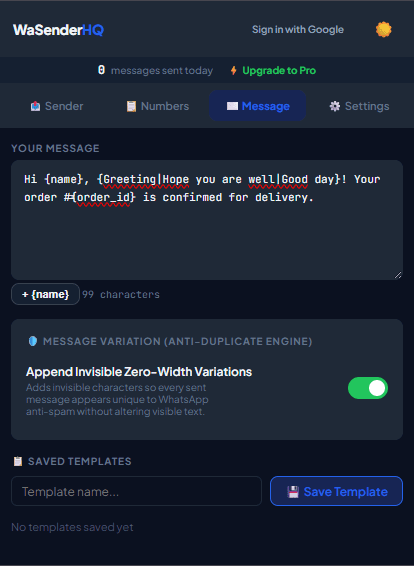
Customers who choose WhatsApp for order communication may expect timely confirmations and tracking updates. Accuracy, recognizable links, and a clear support path matter more than a broad claim of superior results.
Practical workflow
Order confirmations are transactional follow-ups, not a reason to add unrelated promotion. Use accurate order data, verify the destination number, and give the customer a recognizable business identity and support path.
- 1
Export only ready orders
Create a campaign view containing the orders that reached the intended status and have not already received the same update.
- 2
Map stable identifiers
Use order reference, status, estimated date, and an official tracking link. Do not place internal database identifiers in customer-facing text.
- 3
Verify the link domain
Use a recognizable HTTPS domain controlled by the business or carrier. Avoid shortened links that hide the destination.
- 4
Preview edge cases
Check missing tracking numbers, long product names, split shipments, and non-English characters before starting.
- 5
Record queue outcomes
Export the activity log and update the order system so a retry targets only failed or corrected rows.
Pre-send checklist
- Correct order status
- Expected customer number
- Recognizable sender
- Official HTTPS link
- Edge cases previewed
- Retry list isolated
Common mistakes to avoid
Mixing confirmation and promotion
Customers may expect the order update but not a new marketing campaign. Keep purposes separate.
Calling “sent” the same as “delivered”
The extension activity log reflects its observed queue result; it is not a universal guarantee that the recipient read the message.
Measure and improve the workflow
Connect the message to an expected event
Write down the appointment, order, interview, invitation, or service action that makes the message relevant. Use a sending window that matches that event and avoid adding unrelated promotion merely because the recipient supplied a phone number for operational updates.
Test clarity with representative rows
Preview short and long names, missing optional fields, international numbers, dates, amounts, and links. Ask whether the recipient can immediately identify the sender, understand why the message arrived, and know what to do next without opening a suspicious or ambiguous link.
Close the loop in the source system
Use the activity log to correct the booking, order, recruiting, or event record that produced the row. Record opt-outs and channel preferences in the system used to create future lists; otherwise the same unwanted recipient may return in the next export.
Evaluate the service outcome
Review whether the intended confirmation, reminder, or response was completed, not simply whether the queue advanced. Note recurring questions and failed fields, then improve the source data and template before repeating the workflow with another expected-recipient group.
Frequently asked questions
Should I include the full address?
Usually no. Include only the minimum details needed to identify the order and protect customer privacy.
Can I retry failed rows?
Yes, after checking the number and error. Build a separate corrected retry list to avoid duplicates.
Sources and further reading
About the author
The WaSenderHQ Editorial Team documents workflows against the current public extension listing and product source, with a focus on accurate setup, privacy, and responsible use. Articles are revised when product behavior changes.