
Responsible WhatsApp Web Automation: A Practical Checklist
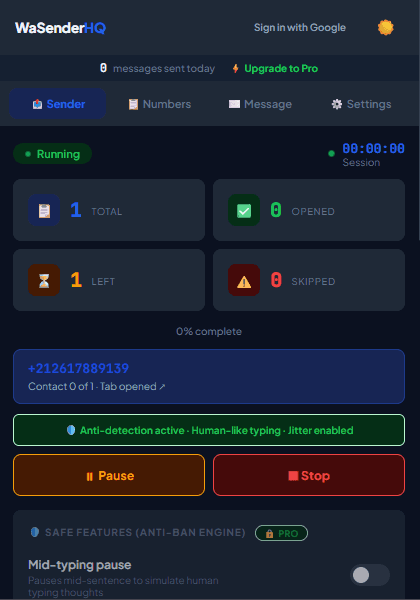
Direct browser messaging can reduce repetitive work, but it still requires responsible recipient selection, relevant content, supervision, and opt-out handling.
1. Gradual Warm-Up Cadence
Start with a small, controlled batch that you can supervise. WaSenderHQ's optional warm-up setting begins with a local cap and increases gradually, but no fixed number can guarantee account status.
2. Measured Delay Intervals
Configure a minimum and maximum wait range that matches a supervised workflow. Delay controls manage pace; they do not make unsolicited contact acceptable or guarantee delivery.
Practical workflow
Responsible browser automation is a supervised workflow, not a way to conceal bulk behavior. The most important controls are recipient permission, relevant content, conservative volume, clear identity, opt-out handling, and a human who can stop the queue.
- 1
Define the expected audience
Document how each recipient asked for or reasonably expects the message. Purchased, scraped, or unrelated lists should not enter the workflow.
- 2
Review the purpose
Use one campaign for one clear purpose. Mixing support updates, promotions, and unrelated announcements makes consent and opt-outs difficult to manage.
- 3
Start with a small batch
Test formatting and operational behavior with a controlled list before increasing the queue. Monitor replies and complaints, not only send counters.
- 4
Use pacing as a guardrail
Choose measured delays and pause when the sender cannot supervise results. Delay settings cannot guarantee delivery or account safety.
- 5
Maintain suppression records
Remove people who opt out, report an error, or no longer match the original purpose before importing the next list.
Pre-send checklist
- Expected recipients only
- Business identity clear
- Single campaign purpose
- Small test completed
- Opt-out process ready
- Queue actively monitored
Common mistakes to avoid
Calling settings “anti-ban”
No delay, typing pattern, or variation can guarantee an account will not be restricted.
Measuring success only by sent count
Replies, opt-outs, complaints, failures, and relevance are more useful signals than raw volume.
Measure and improve the workflow
Define the stop conditions first
Before starting, decide who will supervise the queue and when it must pause: unexpected formatting, a disconnected WhatsApp Web session, a rising failure count, or recipient feedback that the message was not expected. Automation should make a reviewed process repeatable, not remove human judgment.
Measure the workflow, not a vanity number
Track sent, skipped, and failed entries together with pauses, corrections, replies, and opt-out requests. A large sent count does not prove delivery, relevance, or business value. The useful question is whether the intended service task was completed without creating avoidable recipient complaints.
Review access after testing
Check browser permissions, Google access, local drafts, saved schedules, and downloaded activity files after the campaign. Revoke access that is no longer required and remove outdated queues so a future user cannot restart an old campaign by mistake.
Keep a manual recovery path
Document how to stop the queue, reconnect WhatsApp Web, verify the current row, and continue only after the sender understands what happened. If behavior is unexpected, preserve the log and test with your own number rather than repeatedly retrying a real customer.
Frequently asked questions
What delay is guaranteed safe?
There is no guaranteed safe interval. Use a pace appropriate to expected communication and stop when you cannot supervise the queue.
Does personalization make cold outreach acceptable?
No. Inserting a name does not create consent or make an unrelated message relevant.
Sources and further reading
About the author
The WaSenderHQ Editorial Team documents workflows against the current public extension listing and product source, with a focus on accurate setup, privacy, and responsible use. Articles are revised when product behavior changes.